请注意,本文编写于 119 天前,最后修改于 21 天前,其中某些信息可能已经过时。
目录
动态表单在企业级开发中具有很高的价值,不仅可以减少代码量,还可以规范化代码。在Vue体系中,网上有很多这样的组件,但是在angular中相对少很多,这里以@delon/form为例来演示,为它搭建一个表单设计器
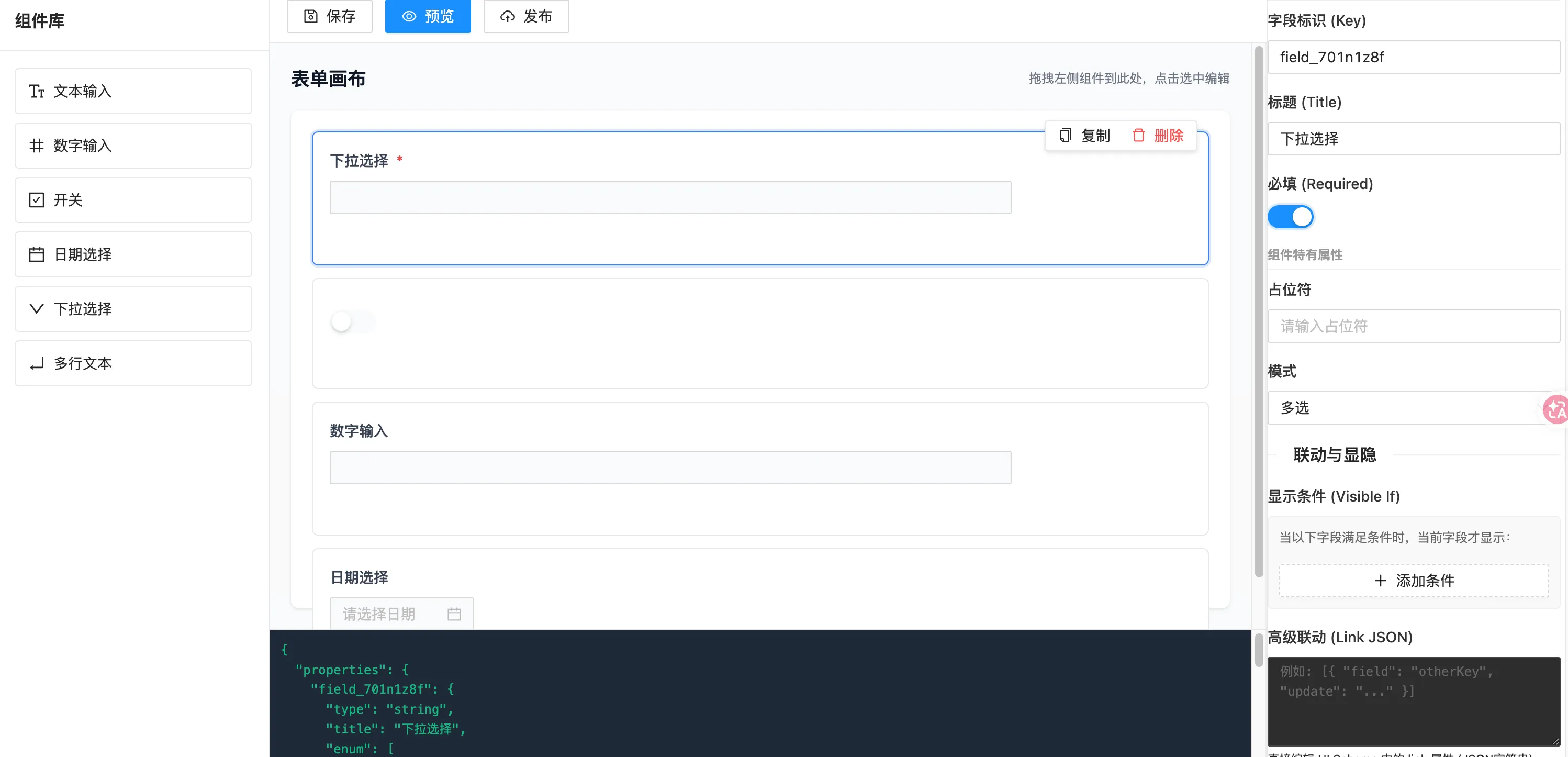
核心代码
tsimport { Injectable } from '@angular/core';
import { BehaviorSubject } from 'rxjs';
import { SFSchema, SFUISchema } from '@delon/form';
import { CdkDragDrop, moveItemInArray } from '@angular/cdk/drag-drop';
import * as _ from 'lodash-es';

export interface DesignerNode {
  id: string;
  key: string;
  type: string;
  title: string;
  schema: any;
  ui: any;
  previewSchema: SFSchema;
  previewUi: SFUISchema;
}

@Injectable({
  providedIn: 'root',
})
export class FormDesignerService {
  private schemaSubject = new BehaviorSubject<SFSchema>({ properties: {} });
  private uiSchemaSubject = new BehaviorSubject<SFUISchema>({});
  private nodesSubject = new BehaviorSubject<DesignerNode[]>([]);
  private selectedIdSubject = new BehaviorSubject<string | null>(null);

  schema$ = this.schemaSubject.asObservable();
  uiSchema$ = this.uiSchemaSubject.asObservable();
  nodes$ = this.nodesSubject.asObservable();
  selectedId$ = this.selectedIdSubject.asObservable();

  get currentSchema(): SFSchema {
    return _.cloneDeep(this.schemaSubject.getValue());
  }
  get currentUISchema(): SFUISchema {
    return _.cloneDeep(this.uiSchemaSubject.getValue());
  }
  get currentNodes(): DesignerNode[] {
    return this.nodesSubject.getValue();
  }

  addField(type: string) {
    const id = this.generateId();
    const key = `field_${id.substring(0, 8)}`;
    const title = this.getDefaultTitle(type);

    // 1. Schema Part
    const schemaPart: any = { type: this.getSchemaType(type), title: title };
    if (type === 'date') schemaPart.format = 'date';
    if (type === 'select') schemaPart.enum = ['选项1', '选项2', '选项3'];

    // 2. UI Part (注意:这里只是配置内容,Key 在存入 ui 对象时再加 $)
    const uiPart: any = { widget: this.getWidgetType(type) };
    if (type === 'textarea') uiPart.rows = 3;

    const newNode: DesignerNode = {
      id,
      key,
      type,
      title,
      schema: schemaPart,
      ui: uiPart,
      previewSchema: { properties: { [key]: schemaPart } },
      // 【关键】previewUi 的 Key 必须带 $
      previewUi: { ['$' + key]: uiPart },
    };

    const schema = this.currentSchema;
    const ui = this.currentUISchema;
    const nodes = this.currentNodes;

    if (!schema.properties) schema.properties = {};

    // 保持 properties 顺序
    const newProperties: any = {};
    nodes.forEach((n) => {
      if ((schema.properties as any)[n.key])
        newProperties[n.key] = (schema.properties as any)[n.key];
    });
    newProperties[key] = schemaPart;
    schema.properties = newProperties;

    // 【关键】存入 UI Schema 时,Key 必须带 $
    ui['$' + key] = uiPart;

    nodes.push(newNode);

    // 更新 Order
    this.updateOrderInUI(schema, ui, nodes);
    this.updateAll(schema, ui, nodes);
    this.selectNode(id);
  }

  copyNode(id: string) {
    const nodes = this.currentNodes;
    const index = nodes.findIndex((n) => n.id === id);
    if (index === -1) return;

    const sourceNode = nodes[index];
    const schema = this.currentSchema;
    const ui = this.currentUISchema;

    const newId = this.generateId();
    const newKey = `${sourceNode.key}_copy_${newId.substring(0, 4)}`;

    const newSchema = _.cloneDeep(sourceNode.schema);
    newSchema.title = `${newSchema.title} (副本)`;
    const newUi = _.cloneDeep(sourceNode.ui);

    const newNode: DesignerNode = {
      id: newId,
      key: newKey,
      type: sourceNode.type,
      title: newSchema.title,
      schema: newSchema,
      ui: newUi,
      previewSchema: { properties: { [newKey]: newSchema } },
      // 【关键】previewUi 的 Key 必须带 $
      previewUi: { ['$' + newKey]: newUi },
    };

    nodes.splice(index + 1, 0, newNode);

    const newProperties: any = {};
    nodes.forEach((n) => {
      newProperties[n.key] = (schema.properties as any)[n.key];
    });
    schema.properties = newProperties;

    // 【关键】存入 UI Schema 时,Key 必须带 $
    ui['$' + newKey] = newUi;

    this.updateOrderInUI(schema, ui, nodes);
    this.updateAll(schema, ui, nodes);
    this.selectNode(newId);
  }

  removeNode(id: string) {
    const nodes = this.currentNodes;
    const index = nodes.findIndex((n) => n.id === id);
    if (index === -1) return;
    const node = nodes[index];
    const schema = this.currentSchema;
    const ui = this.currentUISchema;

    if (schema.properties) delete (schema.properties as any)[node.key];

    // 【关键】删除 UI Schema 时,Key 必须带 $
    delete ui['$' + node.key];

    if (schema.required)
      schema.required = schema.required.filter((k) => k !== node.key);

    nodes.splice(index, 1);
    this.updateOrderInUI(schema, ui, nodes);
    this.updateAll(schema, ui, nodes);
    this.selectNode(null);
  }

  moveNode(event: CdkDragDrop<DesignerNode[]>) {
    const nodes = this.currentNodes;
    moveItemInArray(nodes, event.previousIndex, event.currentIndex);

    const schema = this.currentSchema;
    const newProperties: any = {};
    nodes.forEach((n) => {
      if ((schema.properties as any)[n.key])
        newProperties[n.key] = (schema.properties as any)[n.key];
    });
    schema.properties = newProperties;

    const ui = this.currentUISchema;
    this.updateOrderInUI(schema, ui, nodes);
    this.updateAll(schema, ui, nodes);
  }

  updateFieldConfig(
    id: string,
    updates: { schema?: any; ui?: any; required?: boolean },
  ) {
    const node = this.currentNodes.find((n) => n.id === id);
    if (!node) return;

    const schema = this.currentSchema;
    const ui = this.currentUISchema;
    const key = node.key;

    // 【关键】UI Schema 的 Key 必须带 $
    const uiKey = '$' + key;

    // 1. Update Schema
    if (updates.schema && schema.properties) {
      (schema.properties as any)[key] = {
        ...(schema.properties as any)[key],
        ...updates.schema,
      };
      node.schema = (schema.properties as any)[key];
      if (updates.schema.title) node.title = updates.schema.title;
    }

    // 2. Update Required
    if (updates.required !== undefined) {
      let req = [...(schema.required || [])];
      if (updates.required && !req.includes(key)) req.push(key);
      else if (!updates.required && req.includes(key))
        req = req.filter((k) => k !== key);
      schema.required = req.length > 0 ? req : undefined;
    }

    // 3. Update UI
    if (updates.ui) {
      if (!ui[uiKey]) ui[uiKey] = {};

      Object.keys(updates.ui).forEach((prop) => {
        const value = updates.ui[prop];
        if (value === undefined) delete ui[uiKey][prop];
        else ui[uiKey][prop] = value;
      });

      node.ui = ui[uiKey];
    }

    // 4. Refresh Preview Cache
    node.previewSchema = {
      properties: { [key]: (schema.properties as any)[key] },
    };
    // 【关键】previewUi 的 Key 必须带 $
    node.previewUi = { [uiKey]: { ...ui[uiKey] } };

    // 5. Emit Changes
    this.schemaSubject.next(_.cloneDeep(schema));
    this.uiSchemaSubject.next(_.cloneDeep(ui));
    this.nodesSubject.next([...this.currentNodes]);
  }

  renameKey(id: string, newKey: string) {
    const node = this.currentNodes.find((n) => n.id === id);
    if (!node || node.key === newKey) return;
    if (this.currentNodes.some((n) => n.key === newKey))
      throw new Error(`Key "${newKey}" exists.`);

    const oldKey = node.key;
    const schema = this.currentSchema;
    const ui = this.currentUISchema;
    const nodes = this.currentNodes;

    // Migrate Schema
    if (schema.properties) {
      const oldSchema = (schema.properties as any)[oldKey];
      delete (schema.properties as any)[oldKey];
      (schema.properties as any)[newKey] = oldSchema;
    }

    // Migrate UI (Key with $)
    const oldUiKey = '$' + oldKey;
    const newUiKey = '$' + newKey;
    const oldUi = ui[oldUiKey];
    delete ui[oldUiKey];
    ui[newUiKey] = oldUi;

    // Migrate Required
    if (schema.required) {
      const idx = schema.required.indexOf(oldKey);
      if (idx !== -1) schema.required[idx] = newKey;
    }

    // Update Node
    node.key = newKey;
    node.previewSchema = {
      properties: { [newKey]: (schema.properties as any)[newKey] },
    };
    node.previewUi = { [newUiKey]: ui[newUiKey] };

    this.updateOrderInUI(schema, ui, nodes);
    this.updateAll(schema, ui, nodes);
  }

  selectNode(id: string | null) {
    this.selectedIdSubject.next(id);
  }

  private updateAll(schema: SFSchema, ui: SFUISchema, nodes: DesignerNode[]) {
    this.schemaSubject.next(_.cloneDeep(schema));
    this.uiSchemaSubject.next(_.cloneDeep(ui));
    this.nodesSubject.next([...nodes]);
  }

  private generateId(): string {
    return (
      Math.random().toString(36).substring(2, 15) +
      Math.random().toString(36).substring(2, 15)
    );
  }

  private getDefaultTitle(type: string): string {
    const map: Record<string, string> = {
      string: '文本输入',
      number: '数字输入',
      boolean: '开关',
      date: '日期选择',
      select: '下拉选择',
      textarea: '多行文本',
    };
    return map[type] || '新字段';
  }

  private getSchemaType(type: string): string {
    if (type === 'number') return 'number';
    if (type === 'boolean') return 'boolean';
    return 'string';
  }

  private getWidgetType(type: string): string {
    switch (type) {
      case 'textarea':
        return 'textarea';
      case 'date':
        return 'date';
      case 'select':
        return 'select';
      case 'boolean':
        return 'boolean';
      case 'number':
        return 'input-number';
      default:
        return 'string';
    }
  }

  private updateOrderInUI(
    schema: SFSchema,
    ui: SFUISchema,
    nodes: DesignerNode[],
  ) {
    const orderKeys = nodes.map((n) => n.key); // Order 数组里存的是原始 Key
    if (!ui['*']) ui['*'] = {};
    ui['*'].order = orderKeys;
  }
}
tsimport { Component, OnInit } from '@angular/core';
import { CdkDragDrop } from '@angular/cdk/drag-drop';
import { FormDesignerService, DesignerNode } from './form-designer.service';
import { SFSchema, SFUISchema } from '@delon/form';
import { NzMessageService } from 'ng-zorro-antd/message'; // 引入消息服务

@Component({
  selector: 'app-form-designer',
  template: `
    <div class="designer-container">
      <!-- 左侧:物料库 -->
      <div class="sidebar-left">
        <div class="sidebar-header"><h2>组件库</h2></div>
        <div
          class="sidebar-content"
          cdkDropList
          id="widget-list"
          [cdkDropListData]="widgets"
          [cdkDropListConnectedTo]="['canvas-list']"
          (cdkDropListDropped)="handleDrop($event)"
        >
          <div
            *ngFor="let item of widgets"
            class="widget-item"
            cdkDrag
            [cdkDragData]="item"
          >
            <i
              nz-icon
              [nzType]="item.icon"
              nzTheme="outline"
              class="widget-icon"
            ></i>
            <span>{{ item.label }}</span>
          </div>
        </div>
      </div>

      <!-- 中间:画布 -->
      <div class="main-canvas">
        <!-- 【新增】顶部操作区 -->
        <div class="canvas-toolbar">
          <button nz-button nzType="default" (click)="saveSchema()">
            <i nz-icon nzType="save"></i> 保存
          </button>
          <button nz-button nzType="primary" (click)="openPreview()">
            <i nz-icon nzType="eye"></i> 预览
          </button>
          <button nz-button nzType="default" (click)="publishSchema()">
            <i nz-icon nzType="cloud-upload"></i> 发布
          </button>
        </div>

        <div class="canvas-wrapper">
          <div class="canvas-header">
            <h2>表单画布</h2>
            <span class="tip">拖拽左侧组件到此处,点击选中编辑</span>
          </div>

          <div
            class="canvas-body"
            cdkDropList
            id="canvas-list"
            [cdkDropListData]="nodes"
            [cdkDropListConnectedTo]="['widget-list']"
            (cdkDropListDropped)="handleDrop($event)"
          >
            <div *ngIf="nodes.length === 0" class="empty-state">
              请从左侧拖拽组件到此处
            </div>

            <div
              *ngFor="let node of nodes; let i = index"
              class="canvas-item"
              [class.selected]="selectedId === node.id"
              (click)="selectNode(node.id)"
              cdkDrag
              [cdkDragData]="node"
            >
              <!-- 操作栏 -->
              <div class="item-actions" *ngIf="selectedId === node.id">
                <button
                  nz-button
                  nzType="text"
                  nzSize="small"
                  (click)="copyNode(node.id); $event.stopPropagation()"
                >
                  <i nz-icon nzType="copy"></i> 复制
                </button>
                <button
                  nz-button
                  nzType="text"
                  nzDanger
                  nzSize="small"
                  (click)="removeNode(node.id); $event.stopPropagation()"
                >
                  <i nz-icon nzType="delete"></i> 删除
                </button>
              </div>

              <!-- 标题预览 -->
              <label class="preview-label" *ngIf="!isHiddenLabel(node.type)">
                {{ node.title }}
                <span class="required" *ngIf="isRequired(node.key)">*</span>
              </label>

              <!-- 真实 SF 预览 (设计态,禁用交互) -->
              <div class="sf-wrapper">
                <sf
                  [schema]="node.previewSchema"
                  [ui]="node.previewUi"
                  [formData]="{}"
                  [button]="null"
                  layout="horizontal"
                  size="small"
                ></sf>
              </div>

              <!-- 拖拽手柄 -->
              <div class="drag-handle" cdkDragHandle title="拖拽排序">
                <i nz-icon nzType="drag" nzTheme="outline"></i>
              </div>
            </div>
          </div>
        </div>

        <div class="json-preview">
          <pre>{{ schema | json }}</pre>
        </div>
      </div>

      <!-- 右侧:属性面板 -->
      <div class="sidebar-right">
        <app-property-panel></app-property-panel>
      </div>
    </div>

    <!-- 【新增】预览弹窗 -->
    <nz-modal
      [(nzVisible)]="isPreviewVisible"
      nzTitle="表单预览"
      nzWidth="800px"
      (nzOnCancel)="closePreview()"
      [nzFooter]="modalFooter"
    >
      <ng-container *nzModalContent>
        <div class="preview-modal-content">
          <!-- 修复1: 使用单向绑定 [formData],避免双向绑定报错 -->
          <sf
            [schema]="schema"
            [ui]="ui"
            [formData]="previewFormData"
            (formChange)="onPreviewFormChange($event)"
            (formSubmit)="onPreviewSubmit($event)"
          >
            <!-- 修复2: 将 #sf-button 改为 #sfButton (去除连字符) -->
            <ng-template #sfButton>
              <button nz-button nzType="primary" type="submit">提交测试</button>
            </ng-template>
          </sf>
        </div>
      </ng-container>

      <!-- 自定义底部按钮 -->
      <ng-template #modalFooter>
        <button nz-button nzType="default" (click)="closePreview()">
          关闭
        </button>
        <button nz-button nzType="primary" (click)="triggerPreviewSubmit()">
          触发提交
        </button>
      </ng-template>
    </nz-modal>
  `,
  styles: [
    `
      /* ... 保持之前的样式不变 ... */
      .designer-container {
        display: flex;
        height: 100vh;
        width: 100%;
        overflow: hidden;
        background-color: #f3f4f6;
      }
      .sidebar-left {
        width: 260px;
        background: white;
        border-right: 1px solid #e5e7eb;
        display: flex;
        flex-direction: column;
        flex-shrink: 0;
      }
      .sidebar-header {
        padding: 16px;
        border-bottom: 1px solid #e5e7eb;
      }
      .sidebar-header h2 {
        margin: 0;
        font-size: 16px;
        font-weight: 600;
      }
      .sidebar-content {
        flex: 1;
        overflow-y: auto;
        padding: 16px;
      }
      .widget-item {
        display: flex;
        align-items: center;
        padding: 10px 12px;
        margin-bottom: 8px;
        background: #fff;
        border: 1px solid #e5e7eb;
        border-radius: 4px;
        cursor: move;
        transition: all 0.2s;
      }
      .widget-item:hover {
        border-color: #3b82f6;
        color: #3b82f6;
        box-shadow: 0 2px 4px rgba(0, 0, 0, 0.05);
      }
      .widget-icon {
        margin-right: 8px;
        font-size: 16px;
      }

      .main-canvas {
        flex: 1;
        display: flex;
        flex-direction: column;
        overflow: hidden;
        background: #f9fafb;
      }

      /* 新增:顶部工具栏样式 */
      .canvas-toolbar {
        height: 50px;
        background: white;
        border-bottom: 1px solid #e5e7eb;
        display: flex;
        align-items: center;
        padding: 0 16px;
        gap: 12px;
        flex-shrink: 0;
      }

      .canvas-wrapper {
        flex: 1;
        overflow-y: auto;
        padding: 20px;
        display: flex;
        flex-direction: column;
      }
      .canvas-header {
        margin-bottom: 16px;
        display: flex;
        justify-content: space-between;
        align-items: center;
      }
      .canvas-header h2 {
        margin: 0;
        font-size: 18px;
        font-weight: 600;
        color: #111827;
      }
      .tip {
        font-size: 12px;
        color: #6b7280;
      }
      .canvas-body {
        min-height: 400px;
        background: white;
        border-radius: 8px;
        box-shadow: 0 1px 3px rgba(0, 0, 0, 0.1);
        padding: 20px;
        position: relative;
      }
      .empty-state {
        text-align: center;
        color: #9ca3af;
        padding: 60px 20px;
        border: 2px dashed #e5e7eb;
        border-radius: 8px;
        pointer-events: none;
      }

      .canvas-item {
        position: relative;
        background: white;
        border: 1px solid #e5e7eb;
        border-radius: 6px;
        margin-bottom: 12px;
        padding: 16px;
        transition: all 0.2s;
        cursor: pointer;
      }
      .canvas-item:hover {
        border-color: #bfdbfe;
        box-shadow: 0 4px 6px -1px rgba(0, 0, 0, 0.1);
      }
      .canvas-item.selected {
        border-color: #3b82f6;
        box-shadow: 0 0 0 2px rgba(59, 130, 246, 0.2);
      }
      .item-actions {
        position: absolute;
        top: -12px;
        right: 10px;
        background: white;
        border: 1px solid #e5e7eb;
        border-radius: 4px;
        padding: 2px 4px;
        box-shadow: 0 2px 4px rgba(0, 0, 0, 0.1);
        z-index: 10;
        display: flex;
        gap: 4px;
      }

      .sf-wrapper {
        position: relative;
        z-index: 1;
        margin-top: 8px;
      }
      .sf-wrapper ::ng-deep .ant-input,
      .sf-wrapper ::ng-deep .ant-select-selector,
      .sf-wrapper ::ng-deep .ant-picker,
      .sf-wrapper ::ng-deep .ant-switch,
      .sf-wrapper ::ng-deep textarea {
        pointer-events: none;
        background-color: #f9fafb;
      }
      .sf-wrapper ::ng-deep .ant-form-item {
        margin-bottom: 0 !important;
      }
      .sf-wrapper ::ng-deep .ant-form-item-label {
        display: none;
      }

      .preview-label {
        display: block;
        margin-bottom: 8px;
        font-weight: 500;
        font-size: 14px;
        color: #374151;
      }
      .required {
        color: #ef4444;
        margin-left: 4px;
      }
      .drag-handle {
        position: absolute;
        left: -28px;
        top: 50%;
        transform: translateY(-50%);
        color: #9ca3af;
        cursor: move;
        opacity: 0;
        transition: opacity 0.2s;
        padding: 8px;
        z-index: 20;
        background: rgba(255, 255, 255, 0.8);
        border-radius: 4px;
      }
      .canvas-item:hover .drag-handle {
        opacity: 1;
      }

      .sidebar-right {
        width: 300px;
        background: white;
        border-left: 1px solid #e5e7eb;
        flex-shrink: 0;
        display: flex;
        flex-direction: column;
        overflow-y: auto;
      }
      .json-preview {
        height: 150px;
        background: #1f2937;
        color: #10b981;
        padding: 10px;
        overflow: auto;
        font-family: monospace;
        font-size: 12px;
        border-top: 1px solid #e5e7eb;
      }
      .json-preview pre {
        margin: 0;
      }
      .cdk-drag-placeholder {
        opacity: 0.4;
        border: 2px dashed #3b82f6;
        background: #eff6ff;
      }
      .cdk-drag-preview {
        box-shadow: 0 10px 15px -3px rgba(0, 0, 0, 0.1);
        border-radius: 6px;
        background: white;
      }
      .cdk-drag-animating {
        transition: transform 250ms cubic-bezier(0, 0, 0.2, 1);
      }

      /* 预览弹窗样式 */
      .preview-modal-content {
        max-height: 70vh;
        overflow-y: auto;
        padding: 20px;
        background: #fff;
      }
    `,
  ],
})
export class FormDesignerComponent implements OnInit {
  schema: SFSchema = { properties: {} };
  ui: SFUISchema = {};
  nodes: DesignerNode[] = [];
  selectedId: string | null = null;

  // 预览相关状态
  isPreviewVisible = false;
  previewFormData: any = {};

  widgets = [
    { type: 'string', label: '文本输入', icon: 'font-size' },
    { type: 'number', label: '数字输入', icon: 'number' },
    { type: 'boolean', label: '开关', icon: 'check-square' },
    { type: 'date', label: '日期选择', icon: 'calendar' },
    { type: 'select', label: '下拉选择', icon: 'down' },
    { type: 'textarea', label: '多行文本', icon: 'enter' },
  ];

  constructor(
    private designerService: FormDesignerService,
    private message: NzMessageService, // 注入消息服务
  ) {}

  ngOnInit(): void {
    this.designerService.schema$.subscribe((s) => (this.schema = s));
    this.designerService.uiSchema$.subscribe((u) => {
      console.log('UI Schema:', u);
      this.ui = u;
    });
    this.designerService.nodes$.subscribe((n) => (this.nodes = n));
    this.designerService.selectedId$.subscribe((id) => (this.selectedId = id));
  }

  handleDrop(event: CdkDragDrop<any[]>) {
    if (event.previousContainer.id === 'widget-list') {
      const itemType = event.item.data.type;
      this.designerService.addField(itemType);
    } else if (event.previousContainer.id === 'canvas-list') {
      this.designerService.moveNode(event as CdkDragDrop<DesignerNode[]>);
    }
  }

  selectNode(id: string) {
    this.designerService.selectNode(id);
  }

  copyNode(id: string) {
    this.designerService.copyNode(id);
  }

  removeNode(id: string) {
    this.designerService.removeNode(id);
  }

  isRequired(key: string): boolean {
    return !!this.schema.required?.includes(key);
  }

  isHiddenLabel(type: string): boolean {
    return type === 'boolean';
  }

  // --- 新增:操作栏逻辑 ---

  saveSchema() {
    console.log('Saving Schema:', this.schema, this.ui);
    this.message.success('Schema 已保存到控制台 (模拟)');
    // 在这里调用你的后端 API 保存 schema 和 ui
  }

  publishSchema() {
    this.message.loading('正在发布...');
    setTimeout(() => {
      this.message.success('发布成功 (模拟)');
    }, 1000);
  }

  openPreview() {
    console.log('Opening Preview...');
    console.log('Preview Schema:', this.schema, this.ui);
    this.previewFormData = {}; // 重置表单数据
    this.isPreviewVisible = true;
  }

  closePreview() {
    this.isPreviewVisible = false;
  }

  onPreviewFormChange(value: any) {
    // 实时监听表单变化,可用于调试联动
    // console.log('Preview Form Changed:', value);
  }

  onPreviewSubmit(value: any) {
    console.log('Preview Form Submitted:', value);
    this.message.success('表单提交成功!数据见控制台');
  }

  triggerPreviewSubmit() {
    // 通过 NZ-MODAL 的 footer 按钮触发表单提交
    // 注意:SF 组件的提交通常需要点击内部的 submit 按钮,或者调用 SF 实例的 submit 方法
    // 这里简单起见,我们依赖 SF 内部的校验和提交逻辑
    // 如果需要更精细控制,可以使用 @ViewChild 获取 SF 实例并调用 .submit()
    this.message.info('请点击表单底部的“提交测试”按钮进行正式提交');
  }
}
完整代码
接入AI
为例让 AI 精准理解「你的表单规则」,而不是通用的 JSONSchema,最终输出可直接被你的渲染器解析运行的 Schema。
将支持的所有表单组件 + 对应配置规则作为prompt的一部分传递给AI python示例
python#!/usr/bin/env python
# -*- coding: utf-8 -*-
"""
@Time  : 2026/5/21 23:04
@Author: sql668
@File  : app_handler.py
"""
import os

from flask import request
from openai import OpenAI

from internal.schema.app_schema import CompletionReq
from pkg.response import success_json, validate_error_json

PROMPT_TEMPLATE = """
你是一个专业的动态表单 JSONSchema 生成专家...
请严格按照我提供的规则,生成可直接运行的 JSONSchema。

【规则】
    1. 根节点必须是 {{ title: string, type: "object", required: [], properties: {{}} }}
    2. 只支持以下组件:
       - 输入框 string
       - 数字 number
       - 单选 radio(必须带 enum/enumNames)
       - 多选 checkbox(array + enum)
       - 下拉 select
       - 日期 date
       - 文本域 textarea(widget=textarea)
    3. 必须包含 label 字段作为表单显示名称
    4. 必填字段放入 required 数组
    5. 不要生成我不支持的字段、组件、格式
    6. 输出纯 JSON,不要任何解释文字
【重要】以下是系统支持的所有表单组件,每个组件有固定的配置项,必须严格按照以下规则生成,不允许添加任何未定义的配置项!

    =====================================================================
    一、全局通用配置(所有组件都可以选填)
    所有表单项都支持以下通用配置:
    - label:string,表单显示的标签(必填)
    - placeholder:string,输入提示文字
    - description:string,字段描述/帮助文字
    - default:任意类型,默认值
    - disabled:boolean,是否禁用
    - hidden:boolean,是否隐藏
    =====================================================================

    二、各组件专属配置(必须严格匹配)
    =====================================================================
    1. 【输入框 input】
       基础类型:"type": "string"
       专属配置:
       - maxLength:number,最大输入长度
       - minLength:number,最小输入长度
       - pattern:string,正则校验规则
       示例:
       "username": {{
         "type": "string",
         "label": "姓名",
         "placeholder": "请输入姓名",
         "maxLength": 20,
         "required": true
       }}

    =====================================================================
    2. 【数字输入框 number】
       基础类型:"type": "number"
       专属配置:
       - min:number,最小值
       - max:number,最大值
       示例:
       "age": {{
         "type": "number",
         "label": "年龄",
         "min": 18,
         "max": 60,
         "placeholder": "请输入年龄"
       }}

    =====================================================================
    3. 【下拉选择框 select】
       基础类型:"type": "string"
       【必填专属配置】:
       - enum:string[],选项值(必须写)
       - enumNames:string[],选项显示文本(必须与enum长度一致)
       示例:
       "education": {{
         "type": "string",
         "label": "学历",
         "enum": ["1", "2", "3"],
         "enumNames": ["大专", "本科", "硕士"],
         "placeholder": "请选择学历"
       }}

    =====================================================================
    4. 【单选框 radio】
       基础类型:"type": "string"
       【必填专属配置】:
       - enum:string[],选项值
       - enumNames:string[],选项文本
       示例:
       "gender": {{
         "type": "string",
         "label": "性别",
         "enum": ["male", "female"],
         "enumNames": ["男", "女"]
       }}

    =====================================================================
    5. 【多选框 checkbox】
       基础类型:"type": "array"
       【必填专属配置】:
       - items.type:固定为 "string"
       - items.enum:string[],选项值
       - enumNames:string[],选项文本
       示例:
       "hobby": {{
         "type": "array",
         "label": "兴趣爱好",
         "items": {{ "type": "string", "enum": ["read", "sport", "game"] }},
         "enumNames": ["阅读", "运动", "游戏"]
       }}

    =====================================================================
    6. 【文本域 textarea】
       基础类型:"type": "string"
       【必填专属配置】:
       - widget:固定值 "textarea"
       专属配置:
       - rows:number,显示行数
       示例:
       "remark": {{
         "type": "string",
         "label": "备注",
         "widget": "textarea",
         "rows": 4,
         "placeholder": "请输入备注信息"
       }}

    =====================================================================
    7. 【日期选择器 date】
       基础类型:"type": "string"
       【必填专属配置】:
       - format:固定值 "date"
       示例:
       "entryDate": {{
         "type": "string",
         "label": "入职日期",
         "format": "date"
       }}

    =====================================================================

    【铁律】
    1. 只允许使用上面定义的组件和配置项,禁止自创字段!
    2. 下拉/单选/多选 必须携带 enum + enumNames,缺一不可!
    3. 文本域必须带 widget: "textarea",日期必须带 format: "date"!
    4. 必填字段要同时满足:在 required 数组中 + 字段内写 "required": true
    5. 输出必须是标准JSON,无任何多余文字
【用户需求】
{user_input}
"""


class AppHandler:
    """应用控制器"""

    def ping(self):
        return {"ping": "pong"}

    def completion(self):
        """聊天接口"""
        # 1. 提取从接口中获取的输入,POST
        req = CompletionReq()
        if not req.validate():
            return validate_error_json(req.errors)
        query = request.json.get("query")
        # 2. 构建openai客户端,发起请求
        client = OpenAI(
            # api_key='', 自动读取 OPENAI_API_KEY
            base_url=os.getenv("OPENAI_API_BASE_URL")
        )
        prompt = PROMPT_TEMPLATE.format(user_input=query)
        # 3. 得到请求响应,然后将openai的响应传给前端
        completion = client.chat.completions.create(
            model="qwen3.7-max",
            messages=[
                {"role": "system", "content": "你是OpenAI开发的聊天机器人,请根据用户的输入回复对应的消息"},
                {"role": "user", "content": prompt},
            ],
            # stream=True,
        )
        content = completion.choices[0].message.content
        # resp = Response(code=HttpCode.SUCCESS, message="", data={"content": content})
        return success_json({"content": content})
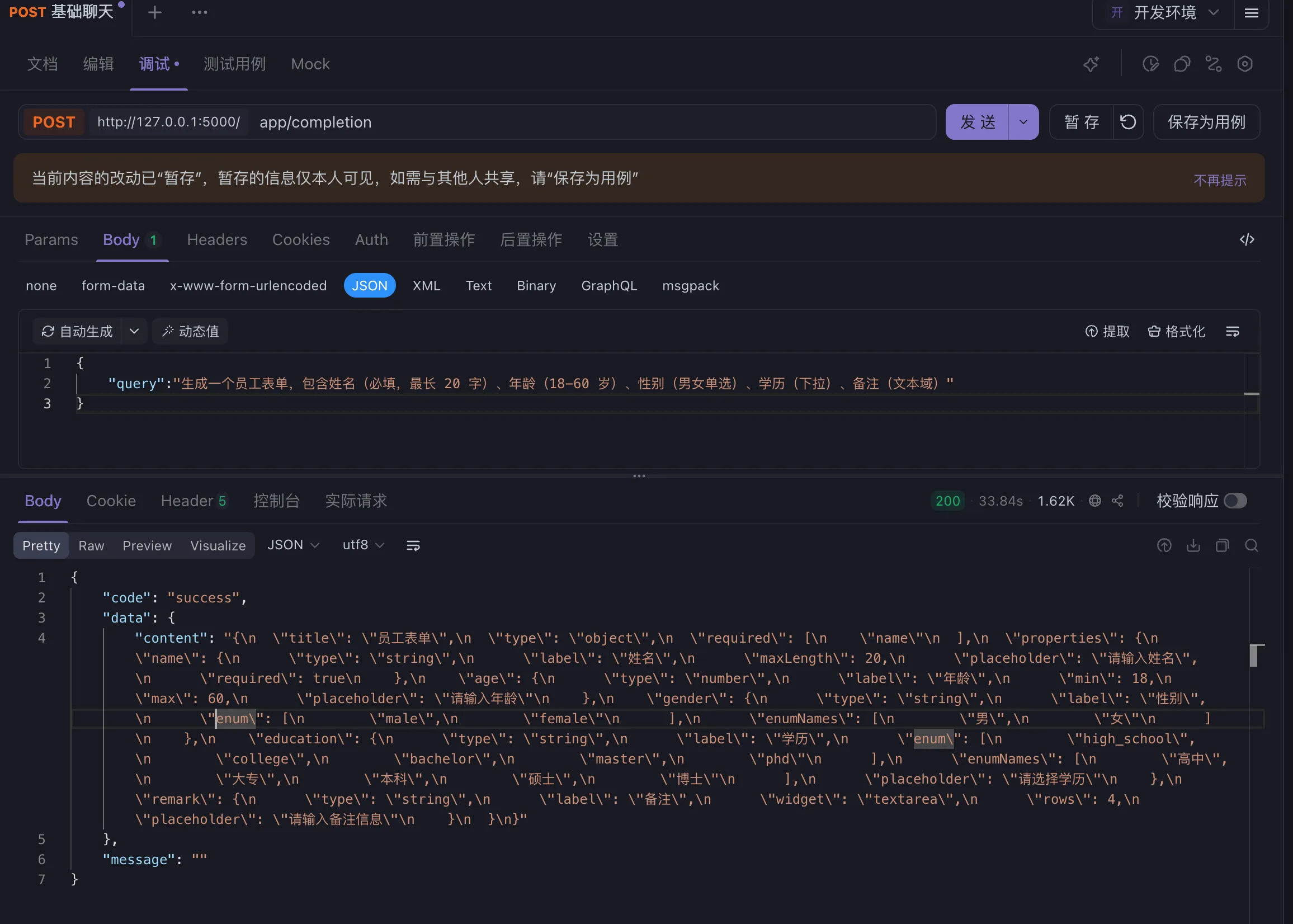
这种方式适合临时的测试,每次都会把规范文档当作输入的一部分,可能会超出AI上下文限制。
可以将所有组件以及组件文档以及示例,以及对应的jsonschema整理成一份文档,上传到RAG知识库
如果对你有用的话,可以打赏哦
打赏


本文作者:繁星
本文链接:
版权声明:本博客所有文章除特别声明外,均采用 BY-NC-SA 许可协议。转载请注明出处!
目录