请注意,本文编写于 236 天前,最后修改于 41 天前,其中某些信息可能已经过时。
目录
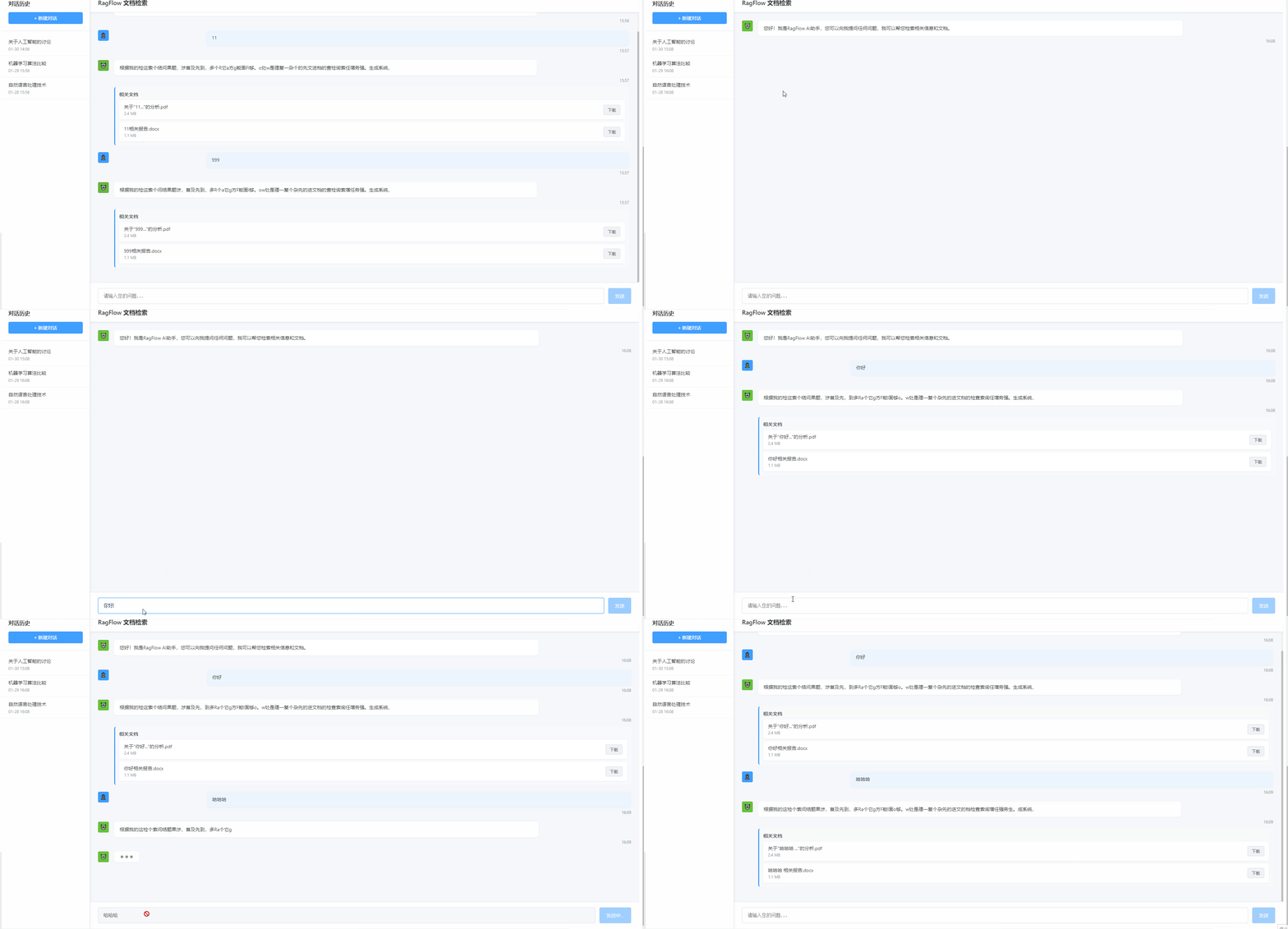
在众多AI项目中,打字机效果是很常见的,我们来模拟下这个效果。前端技术采用的是angular,其它技术也类似。
代码
RagflowComponent.ts
tsimport { Component, OnInit, ViewChild, ElementRef } from '@angular/core';
import { RagflowService } from '../services/ragflow.service';
import { Message, Document, ChatHistory } from '../models/ragflow.models';

@Component({
  selector: 'app-ragflow',
  templateUrl: './ragflow.component.html',
  styleUrls: ['./ragflow.component.css']
})
export class RagflowComponent implements OnInit {
  @ViewChild('messagesContainer') messagesContainer!: ElementRef;

  // 输入框绑定的查询文本
  query: string = '';

  // 消息列表
  messages: Message[] = [];

  // 消息对应的文档映射
  messageDocuments: Map<string, Document[]> = new Map();

  // 所有文档列表(备用)
  documents: Document[] = [];

  // 历史记录
  histories: ChatHistory[] = [];

  // 控制加载状态
  isLoading = false;

  // 控制打字机效果
  isTyping = false;

  constructor(private ragflowService: RagflowService) { }

  ngOnInit(): void {
    // 初始化示例数据
    this.loadSampleData();
  }

  ngAfterViewChecked() {
    // 自动滚动到底部
    this.scrollToBottom();
  }

  private scrollToBottom(): void {
    if (this.messagesContainer) {
      try {
        this.messagesContainer.nativeElement.scrollTop = this.messagesContainer.nativeElement.scrollHeight;
      } catch (err) {
        console.log('Scroll to bottom error:', err);
      }
    }
  }

  loadSampleData(): void {
    // 示例历史记录
    this.histories = [
      { id: '1', title: '关于人工智能的讨论', timestamp: new Date(Date.now() - 3600000) },
      { id: '2', title: '机器学习算法比较', timestamp: new Date(Date.now() - 86400000) },
      { id: '3', title: '自然语言处理技术', timestamp: new Date(Date.now() - 172800000) }
    ];

    // 添加欢迎消息
    setTimeout(() => {
      this.addRagflowMessage("您好!我是RagFlow AI助手,您可以向我提问任何问题,我可以帮您检索相关信息和文档。", []);
    }, 500);
  }

  // 发送消息
  sendMessage(): void {
    if (!this.query.trim()) return;

    // 添加用户消息
    this.addUserMessage(this.query);

    // 开始加载
    this.isLoading = true;
    this.isTyping = true;

    // 使用SSE流式API获取响应
    this.getSseStreamResponseFromApi();
  }

  // 使用SSE流式API获取响应
  private getSseStreamResponseFromApi(): void {
    // 创建一个新的AI消息,初始内容为空
    const aiMessage: Message = {
      id: Date.now().toString(),
      content: '',
      sender: 'ragflow',
      timestamp: new Date()
    };
    this.messages.push(aiMessage);

    // 为该消息初始化空文档列表
    this.messageDocuments.set(aiMessage.id, []);

    // 调用SSE流式API - 在生产环境中使用实际的SSE方法
    // this.ragflowService.getSseStreamResponse(this.query).subscribe(...)

    // 使用模拟的SSE流式API - 开发阶段使用
    this.ragflowService.getMockSseStreamResponse(this.query).subscribe({
      next: (event) => {
        if (event.type === 'delta') {
          // 使用优化的打字机效果处理SSE数据片段
          this.processDeltaWithTypewriter(aiMessage, event.data);
        } else if (event.type === 'source_docs') {
          // 更新此消息的文档
          this.messageDocuments.set(aiMessage.id, event.data);
        } else if (event.type === 'finish') {
          // 流完成,结束加载状态
          this.isLoading = false;
          this.isTyping = false;
          this.query = '';
        }
      },
      error: (error) => {
        console.error('Error getting SSE stream response:', error);
        this.isLoading = false;
        this.isTyping = false;

        // 显示错误信息
        const errorMessage: Message = {
          id: Date.now().toString(),
          content: '抱歉,发生了一个错误,请稍后重试。',
          sender: 'ragflow',
          timestamp: new Date()
        };
        this.messages.push(errorMessage);
      }
    });
  }

  // 处理SSE数据片段,使用打字机效果
  private processDeltaWithTypewriter(message: Message, delta: string) {
    // 将delta内容逐字符添加到消息中,实现打字机效果
    let index = 0;

    const addChar = () => {
      if (index < delta.length) {
        message.content += delta.charAt(index);
        index++;
        // 根据字符类型决定延迟
        const delay = this.getCharacterDelay(delta.charAt(index - 1));
        setTimeout(addChar, delay);
      }
    };

    addChar();
  }

  // 添加用户消息
  addUserMessage(content: string): void {
    const message: Message = {
      id: Date.now().toString(),
      content,
      sender: 'user',
      timestamp: new Date()
    };
    this.messages.push(message);
  }

  // 添加RagFlow消息(带打字机效果)
  addRagflowMessage(content: string, documents: Document[]): void {
    const message: Message = {
      id: Date.now().toString(),
      content: '',
      sender: 'ragflow',
      timestamp: new Date()
    };
    this.messages.push(message);

    // 为该消息关联文档
    this.messageDocuments.set(message.id, documents);

    // 使用优化后的打字机效果
    this.typeMessage(message, content);
  }

  // 优化后的打字机效果实现
  private typeMessage(message: Message, fullText: string): void {
    // 根据字符类型动态调整打字速度
    let i = 0;
    const typeWriter = () => {
      if (i < fullText.length) {
        // 获取当前字符
        const char = fullText.charAt(i);

        // 根据字符类型决定延迟时间
        let delay = this.getCharacterDelay(char);

        message.content += char;
        i++;

        setTimeout(typeWriter, delay);
      }
    };

    typeWriter();
  }

  // 根据字符类型获取延迟时间
  private getCharacterDelay(char: string): number {
    // 中文字符稍微慢一点
    if (/[\u4e00-\u9fa5]/.test(char)) {
      return 50 + Math.random() * 30; // 50-80ms
    }
    // 标点符号稍微停顿
    else if (/[,。;:!?、,.;:!?\s]/.test(char)) {
      return 60 + Math.random() * 40; // 60-100ms
    }
    // 其他字符正常速度
    else {
      return 30 + Math.random() * 20; // 30-50ms
    }
  }

  // 根据消息ID获取相关文档
  getDocumentsForMessage(messageId: string): Document[] {
    const docs = this.messageDocuments.get(messageId);
    return docs ? docs : [];
  }

  // 下载文档
  downloadDocument(doc: Document): void {
    console.log(`Downloading document: ${doc.name}`);
    // 这里应该是实际的下载逻辑
    alert(`正在模拟下载文档: ${doc.name}`);
  }

  // 选择历史记录
  selectHistory(history: ChatHistory): void {
    console.log(`Selected history: ${history.title}`);
    // 在实际实现中,这里会加载选中的对话历史
    const docs: Document[] = [
      { id: 'hist-doc1', name: `${history.title}.pdf`, size: '1.5 MB', url: '#' }
    ];
    this.addRagflowMessage(`您选择了历史对话: "${history.title}",这是相关的信息摘要...`, docs);
  }

  // 键盘事件处理
  handleKeyPress(event: KeyboardEvent): void {
    if (event.key === 'Enter' && !event.shiftKey) {
      event.preventDefault();
      this.sendMessage();
    }
  }
}
RagflowService.ts
tsimport { Injectable } from '@angular/core';
import { HttpClient } from '@angular/common/http';
import { Observable, Subject } from 'rxjs';
import { Message, Document } from '../models/ragflow.models';

@Injectable({
  providedIn: 'root'
})
export class RagflowService {

  private baseUrl = 'http://localhost:8000/api/chat'; // 后端SSE接口基础路径

  constructor(private http: HttpClient) { }

  /**
   * 使用SSE获取流式AI回复
   * @param query 用户查询内容
   * @param topK 返回文档数
   * @returns Observable<{ type: string, data: any }> 返回SSE事件流
   */
  getSseStreamResponse(query: string, topK: number = 5) {
    const subject = new Subject<{ type: string, data: any }>();

    // 实际生产环境中的代码会创建SSE连接
    const eventSource = new EventSource(`${this.baseUrl}/sse?query=${encodeURIComponent(query)}&topK=${topK}`);

    // 使用类型断言处理自定义事件
    eventSource.addEventListener('delta', (event: any) => {
      subject.next({ type: 'delta', data: event.data });
    });

    eventSource.addEventListener('source_docs', (event: any) => {
      const docs: any[] = JSON.parse(event.data);
      // 转换后端返回的文档数据格式为前端需要的格式
      const formattedDocs: Document[] = docs.map(doc => ({
        id: doc.id || `doc-${Date.now()}`,
        name: doc.filename || doc.name || `文档${Date.now()}`,
        size: doc.size || '未知大小',
        url: doc.url || '#'
      }));
      subject.next({ type: 'source_docs', data: formattedDocs });
    });

    eventSource.addEventListener('finish', (event: any) => {
      subject.next({ type: 'finish', data: null });
    });

    eventSource.onerror = (error) => {
      subject.error(error);
      eventSource.close();
    };

    // 监听complete事件关闭连接
    subject.subscribe({
      complete: () => {
        eventSource.close();
      }
    });

    return subject.asObservable();
  }

  /**
   * 模拟流式响应(开发阶段使用)
   * @param query 用户查询内容
   * @param topK 返回文档数
   * @returns Observable<{ type: string, data: any }>
   */
  getMockSseStreamResponse(query: string, topK: number = 5) {
    const subject = new Subject<{ type: string, data: any }>();

    // 模拟SSE流式响应
    setTimeout(() => {
      subject.next({ type: 'delta', data: '根据我的检索结果,' });
    }, 300);

    setTimeout(() => {
      subject.next({ type: 'delta', data: '这个问题涉及到多个方面。' });
    }, 600);

    setTimeout(() => {
      subject.next({ type: 'delta', data: '首先,RagFlow是一个先进的检索增强生成系统,' });
    }, 900);

    setTimeout(() => {
      subject.next({ type: 'delta', data: '它能够处理复杂的文档查询任务。' });
    }, 1200);

    // 模拟返回相关文档
    setTimeout(() => {
      const docs: Document[] = [
        { id: 'doc1', name: `关于"${query.substring(0, 10)}..."的分析.pdf`, size: '2.4 MB', url: '#' },
        { id: 'doc2', name: `${query.substring(0, 8)}相关报告.docx`, size: '1.1 MB', url: '#' }
      ];
      subject.next({ type: 'source_docs', data: docs });
    }, 1500);

    // 发送完成信号
    setTimeout(() => {
      subject.next({ type: 'finish', data: null });
      subject.complete();
    }, 1800);

    return subject.asObservable();
  }
}
RagFlow.model.ts
tsexport interface Message {
  id: string;
  content: string;
  sender: 'user' | 'ragflow';
  timestamp: Date;
}

export interface Document {
  id: string;
  name: string;
  size: string;
  url: string;
}

export interface ChatHistory {
  id: string;
  title: string;
  timestamp: Date;
}
RagFlowComponent.html
html<div class="ragflow-container">
  <div class="sidebar">
    <div class="history-header">
      <h3>对话历史</h3>
      <button class="new-chat-btn">+ 新建对话</button>
    </div>
    <div class="history-list">
      <div
        *ngFor="let history of histories"
        class="history-item"
        (click)="selectHistory(history)"
      >
        <div class="history-title">{{ history.title }}</div>
        <div class="history-time">{{ history.timestamp | date:'MM-dd HH:mm' }}</div>
      </div>
    </div>
  </div>

  <div class="chat-container">
    <div class="chat-header">
      <h2>RagFlow 文档检索</h2>
    </div>

    <div class="messages-container" #messagesContainer>
      <div *ngFor="let message of messages" class="message-row" [class.user-message]="message.sender === 'user'">
        <div class="message-avatar">
          <span *ngIf="message.sender === 'user'" class="avatar-user">👤</span>
          <span *ngIf="message.sender === 'ragflow'" class="avatar-ragflow">🤖</span>
        </div>
        <div class="message-content">
          <div class="message-text">{{ message.content }}</div>
          <div class="message-time">{{ message.timestamp | date:'HH:mm' }}</div>

          <!-- 相关文档仅在AI回复时显示 -->
          <div class="documents-section" *ngIf="message.sender === 'ragflow' && getDocumentsForMessage(message.id).length > 0">
            <h4>相关文档</h4>
            <div class="document-list">
              <div *ngFor="let doc of getDocumentsForMessage(message.id)" class="document-item">
                <div class="document-info">
                  <div class="document-name">{{ doc.name }}</div>
                  <div class="document-size">{{ doc.size }}</div>
                </div>
                <button class="download-btn" (click)="downloadDocument(doc)">下载</button>
              </div>
            </div>
          </div>
        </div>
      </div>

      <div *ngIf="isTyping" class="message-row">
        <div class="message-avatar">
          <span class="avatar-ragflow">🤖</span>
        </div>
        <div class="message-content">
          <div class="typing-indicator">
            <span></span>
            <span></span>
            <span></span>
          </div>

          <!-- 如果正在输入时也有相关文档,则显示 -->
          <div class="documents-section" *ngIf="documents.length > 0">
            <h4>相关文档</h4>
            <div class="document-list">
              <div *ngFor="let doc of documents" class="document-item">
                <div class="document-info">
                  <div class="document-name">{{ doc.name }}</div>
                  <div class="document-size">{{ doc.size }}</div>
                </div>
                <button class="download-btn" (click)="downloadDocument(doc)">下载</button>
              </div>
            </div>
          </div>
        </div>
      </div>
    </div>

    <div class="input-container">
      <textarea
        [(ngModel)]="query"
        (keydown)="handleKeyPress($event)"
        placeholder="请输入您的问题..."
        class="query-input"
        rows="1"
        [disabled]="isLoading"
      ></textarea>
      <button
        (click)="sendMessage()"
        class="send-btn"
        [disabled]="isLoading || !query.trim()"
      >
        <span *ngIf="isLoading">发送中...</span>
        <span *ngIf="!isLoading">发送</span>
      </button>
    </div>
  </div>
</div>
ragflow.component.css
css.ragflow-container {
  display: flex;
  height: 100vh;
  background-color: #f5f7fb;
  font-family: -apple-system, BlinkMacSystemFont, 'Segoe UI', 'PingFang SC', 'Hiragino Sans GB', 'Microsoft YaHei', sans-serif;
}

.sidebar {
  width: 260px;
  background: #ffffff;
  border-right: 1px solid #e4e7ed;
  display: flex;
  flex-direction: column;
  box-shadow: 2px 0 8px rgba(29, 35, 41, 0.05);
  z-index: 10;
}

.history-header {
  padding: 20px;
  border-bottom: 1px solid #e4e7ed;
}

.history-header h3 {
  margin: 0 0 15px 0;
  font-size: 16px;
  font-weight: 600;
  color: #303133;
}

.new-chat-btn {
  width: 100%;
  padding: 8px 12px;
  background-color: #409eff;
  color: white;
  border: none;
  border-radius: 4px;
  cursor: pointer;
  font-size: 14px;
  transition: background-color 0.3s;
}

.new-chat-btn:hover {
  background-color: #66b1ff;
}

.history-list {
  flex: 1;
  overflow-y: auto;
  padding: 10px 0;
}

.history-item {
  padding: 12px 20px;
  cursor: pointer;
  border-bottom: 1px solid #f4f4f5;
  transition: background-color 0.2s;
}

.history-item:hover {
  background-color: #ecf5ff;
}

.history-title {
  font-size: 14px;
  color: #303133;
  margin-bottom: 4px;
  white-space: nowrap;
  overflow: hidden;
  text-overflow: ellipsis;
}

.history-time {
  font-size: 12px;
  color: #909399;
}

.chat-container {
  flex: 1;
  display: flex;
  flex-direction: column;
  position: relative;
}

.chat-header {
  padding: 16px 24px;
  border-bottom: 1px solid #e4e7ed;
  background: #ffffff;
  box-shadow: 0 2px 4px rgba(0,0,0,0.05);
}

.chat-header h2 {
  margin: 0;
  font-size: 18px;
  font-weight: 600;
  color: #303133;
}

.messages-container {
  flex: 1;
  overflow-y: auto;
  padding: 24px;
  display: flex;
  flex-direction: column;
}

.message-row {
  display: flex;
  margin-bottom: 20px;
  animation: fadeIn 0.3s ease-in;
}

@keyframes fadeIn {
  from { opacity: 0; transform: translateY(10px); }
  to { opacity: 1; transform: translateY(0); }
}

.message-avatar {
  width: 36px;
  margin-right: 12px;
  flex-shrink: 0;
  display: flex;
  align-items: flex-start;
}

.avatar-user {
  display: inline-block;
  width: 32px;
  height: 32px;
  line-height: 32px;
  text-align: center;
  background: #409eff;
  color: white;
  border-radius: 4px;
  font-size: 14px;
}

.avatar-ragflow {
  display: inline-block;
  width: 32px;
  height: 32px;
  line-height: 32px;
  text-align: center;
  background: #67c23a;
  color: white;
  border-radius: 4px;
  font-size: 14px;
}

.message-content {
  flex: 1;
}

.message-text {
  background: white;
  padding: 12px 16px;
  border-radius: 8px;
  box-shadow: 0 1px 2px rgba(0,0,0,0.05);
  color: #303133;
  line-height: 1.6;
  max-width: 80%;
  white-space: pre-wrap;
  word-break: break-word;
}

.user-message .message-text {
  background: #ecf5ff;
  margin-left: auto;
}

.message-time {
  font-size: 12px;
  color: #909399;
  margin-top: 6px;
  text-align: right;
}

.documents-section {
  margin-top: 12px;
  padding: 12px;
  background: #f8f9fc;
  border-radius: 6px;
  border-left: 3px solid #409eff;
}

.documents-section h4 {
  margin: 0 0 8px 0;
  font-size: 14px;
  color: #606266;
  font-weight: 600;
}

.document-list {
  display: flex;
  flex-direction: column;
  gap: 8px;
}

.document-item {
  display: flex;
  justify-content: space-between;
  align-items: center;
  padding: 10px 14px;
  background: white;
  border-radius: 6px;
  box-shadow: 0 1px 3px rgba(0,0,0,0.05);
}

.document-info {
  flex: 1;
}

.document-name {
  font-size: 14px;
  color: #303133;
  margin-bottom: 2px;
}

.document-size {
  font-size: 12px;
  color: #909399;
}

.download-btn {
  padding: 6px 12px;
  background: #f0f2f5;
  border: 1px solid #dcdfe6;
  border-radius: 4px;
  color: #606266;
  cursor: pointer;
  font-size: 12px;
  transition: all 0.2s;
}

.download-btn:hover {
  background: #ecf5ff;
  color: #409eff;
  border-color: #b3d8ff;
}

.typing-indicator {
  display: flex;
  align-items: center;
  padding: 12px 16px;
  background: white;
  border-radius: 8px;
  box-shadow: 0 1px 2px rgba(0,0,0,0.05);
  width: fit-content;
}

.typing-indicator span {
  width: 8px;
  height: 8px;
  background: #909399;
  border-radius: 50%;
  margin: 0 3px;
  animation: typing 1.4s infinite ease-in-out;
}

.typing-indicator span:nth-child(1) {
  animation-delay: 0s;
}

.typing-indicator span:nth-child(2) {
  animation-delay: 0.2s;
}

.typing-indicator span:nth-child(3) {
  animation-delay: 0.4s;
}

@keyframes typing {
  0%, 60%, 100% { transform: translateY(0); }
  30% { transform: translateY(-5px); }
}

.input-container {
  padding: 16px 24px;
  background: white;
  border-top: 1px solid #e4e7ed;
  display: flex;
}

.query-input {
  flex: 1;
  padding: 12px 16px;
  border: 1px solid #dcdfe6;
  border-radius: 4px;
  resize: none;
  font-size: 14px;
  line-height: 1.5;
  max-height: 120px;
  outline: none;
  transition: border-color 0.2s;
}

.query-input:focus {
  border-color: #409eff;
  box-shadow: 0 0 0 2px rgba(64, 158, 255, 0.1);
}

.query-input:disabled {
  background-color: #f5f7fa;
  cursor: not-allowed;
}

.send-btn {
  margin-left: 12px;
  padding: 12px 20px;
  background: #409eff;
  color: white;
  border: none;
  border-radius: 4px;
  cursor: pointer;
  font-size: 14px;
  transition: background-color 0.2s;
}

.send-btn:disabled {
  background: #a0cfff;
  cursor: not-allowed;
}

.send-btn:not(:disabled):hover {
  background: #66b1ff;
}

/* 滚动条样式 */
.messages-container::-webkit-scrollbar {
  width: 6px;
}

.messages-container::-webkit-scrollbar-track {
  background: #f1f1f1;
}

.messages-container::-webkit-scrollbar-thumb {
  background: #c1c1c1;
  border-radius: 3px;
}

.messages-container::-webkit-scrollbar-thumb:hover {
  background: #a8a8a8;
}

@media (max-width: 768px) {
  .ragflow-container {
    flex-direction: column;
  }

  .sidebar {
    width: 100%;
    height: auto;
    border-right: none;
    border-bottom: 1px solid #e4e7ed;
  }

  .history-header {
    display: flex;
    align-items: center;
    justify-content: space-between;
  }

  .history-header h3 {
    margin-bottom: 0;
  }

  .new-chat-btn {
    width: auto;
    margin-left: 10px;
  }
}
效果演示
HttpClient + Observable 模拟SSE 方案
原生的sse无法自定义请求头且只支持get请求,在鉴权方面需要采取其他措施,这里采用angular体系的HttpClient实现sse效果
封装 SSE 通用服务 sse.service.ts
typescriptimport { Injectable } from '@angular/core';
import { HttpClient, HttpHeaders } from '@angular/common/http';
import { Observable } from 'rxjs';
import { map } from 'rxjs/operators';

@Injectable({ providedIn: 'root' })
export class SseService {
  constructor(private http: HttpClient) {}

  /**
   * 大模型SSE流式对话
   * @param url 后端流式接口地址
   * @param params 请求体(prompt、历史对话等)
   * @returns Observable<string> 逐段返回模型输出文本
   */
  chatStream(url: string, params: Record<string, any>): Observable<string> {
    const headers = new HttpHeaders({
      'Content-Type': 'application/json',
      'Accept': 'text/event-stream',
      // 全局token可放拦截器,这里演示手动携带
      'Authorization': `Bearer ${localStorage.getItem('token')}`
    });

    let singleStreamBuffer = '';

    return this.http.post(url, params, {
      headers,
      responseType: 'text',
      observe: 'events',
      reportProgress: true // 开启流式进度接收
    }).pipe(
      map(event => {
        if (event.type !== 4 || !event.partialText) return '';
          const fullText = event.partialText;
          // 只计算当前这条流的增量
          const chunkText = fullText.slice(singleStreamBuffer.length);
          singleStreamBuffer = fullText;

          return this.extractSseChunk(chunkText);
      })
    );
  }

  private extractSseChunk(incrementText: string): string {
      let res = '';
      const lines = incrementText.split('\n');
      for (const line of lines) {
        if (line.startsWith('data: ')) {
          const data = line.replace('data: ', '').trim();
          if (data === '[DONE]') continue;
          res += data;
        }
      }
      return res;
    }
}
如果对你有用的话,可以打赏哦
打赏


本文作者:繁星
本文链接:
版权声明:本博客所有文章除特别声明外,均采用 BY-NC-SA 许可协议。转载请注明出处!
目录