请注意,本文编写于 352 天前,最后修改于 352 天前,其中某些信息可能已经过时。
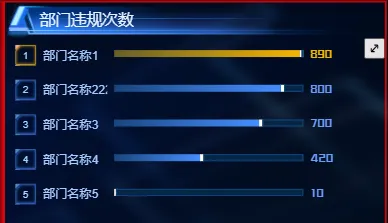
在大屏可视化开发中,如果将一个图表放大显示,一般做法是将图表放到dialog组件中再写一次,这样会出额外增加工作量,那么有什么方法可以避免这些呢,今天我们就实现一个图表容器组件,它只是作为图表的父容器,在右上角有一个放大的按钮,点击就会出现一个弹窗,图表在弹窗中又显示一次
resize-dialog-view.component.ts
tsimport {
  Component,
  Input,
  Output,
  EventEmitter,
  ElementRef,
  ViewChild,
  AfterViewInit,
  HostListener,
  ContentChild,
  TemplateRef,
  ViewContainerRef
} from '@angular/core';
import { dialogAnimations } from './resize-dialog-view.animation';

@Component({
  selector: 'app-resize-dialog-view',
  templateUrl: './resize-dialog-view.component.html',
  styleUrls: ['./resize-dialog-view.component.less'],
  animations: [dialogAnimations.overlayFade, dialogAnimations.dialogSlide]
})
export class ResizeDialogViewComponent implements AfterViewInit {
  // 输入属性
  @Input() maxWidth: string | number = '90%';
  @Input() maxHeight: string | number = '90%';
  @Input() maxPosition: { top?: string; left?: string } = {};
  @Input() hasOverlay: boolean = true;

  /** 是否显示最大化,最小化切换按钮 */
  @Input() showTagBtn: boolean = true;

  // 输出事件
  @Output() onOpen = new EventEmitter();
  @Output() onClose = new EventEmitter();
  @Output() onOpenAfter = new EventEmitter();
  @Output() onCloseAfter = new EventEmitter();

  // 视图引用
  @ViewChild('contentRef') content!: ElementRef;

  @ContentChild(TemplateRef) contentTemplate: TemplateRef<any>;

  @ViewChild('portalOutlet', { read: ViewContainerRef })
  portalOutlet: ViewContainerRef;
  @ViewChild('targetLocation', { read: ViewContainerRef })
  targetLocation: ViewContainerRef;

  _isOpen = false;
  // 状态
  set isOpen(v) {
    if (v !== this._isOpen) {
      this._isOpen = v;
    }
  }

  get isOpen() {
    return this._isOpen;
  }

  isAnimating = false;

  showButton = false;

  // 当前状态计算值
  get currentWidth(): string {
    return this.isOpen ? this.parseSize(this.maxWidth) : '100%';
  }

  get currentHeight(): string {
    return this.isOpen ? this.parseSize(this.maxHeight) : '100%';
  }

  get currentPosition(): any {
    if (!this.isOpen) return {};

    return {
      top: this.maxPosition.top || '50%',
      left: this.maxPosition.left || '50%'
    };
  }

  constructor() {}

  ngAfterViewInit() {}

  // 切换对话框状态
  toggleDialog() {
    if (this.isAnimating) return;
    if (this.isOpen) {
      this.closeDialog();
    } else {
      this.openDialog();
      this.showButton = false;
    }
  }

  // 打开对话框
  openDialog() {
    this.onOpen.emit();
    this.isAnimating = true;
    // 设置状态后开始动画
    setTimeout(() => {
      this.isOpen = true;
    }, 10);
  }

  // 关闭对话框
  closeDialog() {
    this.onClose.emit();
    this.isAnimating = true;
    this.isOpen = false;
  }

  // 处理动画结束事件
  handleAnimationDone(event: any) {
    this.isAnimating = false;
    if (this.isOpen) {
      this.onOpenAfter.emit();
    } else {
      this.onCloseAfter.emit();
    }
  }

  // 在后台点击关闭对话框
  @HostListener('document:keydown.escape')
  handleEscape() {
    if (this.isOpen) {
      this.closeDialog();
    }
  }

  // 尺寸解析辅助函数
  private parseSize(size: string | number): string {
    if (typeof size === 'number') {
      return `${size}px`;
    }
    return size;
  }
}
resize-dialog-view.animation.ts
tsimport {
  trigger,
  state,
  style,
  animate,
  transition
} from '@angular/animations';

export const dialogAnimations = {
  overlayFade: trigger('overlayFade', [
    state('void', style({ opacity: 0 })),
    state('*', style({ opacity: 1 })),
    transition(':enter', animate('300ms ease-out')),
    transition(':leave', animate('200ms ease-in'))
  ]),

  dialogSlide: trigger('dialogSlide', [
    transition(':enter', [
      style({
        opacity: 0,
        transform: 'scale(0.5) translate(-50%, -50%)'
      }),
      animate(
        '300ms ease-out',
        style({
          opacity: 1,
          transform: 'scale(1) translate(-50%, -50%)'
        })
      )
    ]),
    transition(':leave', [
      style({
        opacity: 1,
        transform: 'scale(1) translate(-50%, -50%)'
      }),
      animate(
        '200ms ease-in',
        style({
          opacity: 0,
          transform: 'scale(0.7) translate(-50%, -50%)'
        })
      )
    ])
  ])
};
resize-dialog-view.component.html
html<!-- 正常状态下的内容容器 -->
<div class="normal-view" #contentContainer>
  <ng-container *ngTemplateOutlet="contentTemplate"></ng-container>
  <!-- 在正常状态下显示的最大化按钮 -->
  <div class="toggle-btn-container" *ngIf="!isOpen && !isAnimating && showTagBtn" (mouseenter)="showButton=true" (mouseleave)="showButton=false">
    <button
      class="toggle-btn"
      title="最大化查看"
      (click)="toggleDialog()"
      [style.opacity]="showButton ? 1 : 0">

      <svg t="1756691947246" class="icon" viewBox="0 0 1024 1024" version="1.1" xmlns="http://www.w3.org/2000/svg" p-id="4428"><path d="M736 352v144c0 17.7-14.3 32-32 32s-32-14.3-32-32v-89.1c0-3.6-4.3-5.3-6.8-2.8L404.1 665.2c-2.5 2.5-0.7 6.8 2.8 6.8H496c17.7 0 32 14.3 32 32s-14.3 32-32 32H352c-35.3 0-64-28.7-64-64V528c0-17.7 14.3-32 32-32s32 14.3 32 32v89.1c0 3.6 4.3 5.3 6.8 2.8l261.1-261.1c2.5-2.5 0.7-6.8-2.8-6.8H528c-17.7 0-32-14.3-32-32s14.3-32 32-32h144c35.3 0 64 28.7 64 64z" p-id="4429" fill="currentColor"></path></svg>

    </button>
  </div>
</div>

<!-- 蒙层 -->
<div
  *ngIf="hasOverlay && isOpen"
  class="overlay-backdrop"
  (@overlayFade.done)="handleAnimationDone($event)"
  [@overlayFade]="isOpen"
  (click)="closeDialog()">
</div>

<!-- 对话框容器 -->
<div
*ngIf="isOpen"
  class="dialog-container"
  [@dialogSlide]="isOpen"
  [style.width]="currentWidth"
  [style.height]="currentHeight"
  [style.top]="currentPosition.top"
  [style.left]="currentPosition.left"
  (click)="$event.stopPropagation()">

  <ng-container *ngTemplateOutlet="contentTemplate"></ng-container>
  <!-- 在对话框状态中显示的最小化按钮 -->
  <div class="control-bar">
    <button class="toggle-btn" title="最小化" (click)="toggleDialog()">
      <svg t="1756691994464" class="icon" viewBox="0 0 1024 1024" version="1.1" xmlns="http://www.w3.org/2000/svg" p-id="5417"><path d="M832 32H192A160.192 160.192 0 0 0 32 192v640A160.192 160.192 0 0 0 192 992h640a160.192 160.192 0 0 0 160-160V192A160.192 160.192 0 0 0 832 32zM928 832a96.128 96.128 0 0 1-96 96H192A96.128 96.128 0 0 1 96 832V192A96.128 96.128 0 0 1 192 96h640A96.128 96.128 0 0 1 928 192z" p-id="5418"></path><path d="M460.16 546.496A31.936 31.936 0 0 0 448 544H320a32 32 0 0 0 0 64h50.752l-137.408 137.344a32 32 0 1 0 45.312 45.248L416 653.248V704a32 32 0 0 0 64 0V576a32.128 32.128 0 0 0-19.84-29.568zM745.344 233.408L608 370.752V320a32 32 0 0 0-64 0v128a32.128 32.128 0 0 0 32 32h128a32 32 0 0 0 0-64h-50.752l137.408-137.408a32 32 0 1 0-45.248-45.184z" p-id="5419" fill="currentColor"></path></svg>
    </button>
  </div>
</div>


<!-- <ng-template #contentTemplate>
  <ng-content></ng-content>
</ng-template> -->
resize-dialog-view.component.less
less.resize-dialog-container {
  height: 100%;
  width: 100%;
  position: relative;
}

.normal-view {
  width: 100%;
  height: 100%;
  position: relative;
}

.overlay-backdrop {
  position: fixed;
  top: 0;
  left: 0;
  width: 100%;
  height: 100%;
  background-color: rgba(0, 0, 0, 0.75);
  z-index: 1000;
  pointer-events: auto;
}

.dialog-container {
  position: fixed;
  z-index: 1001;
  transform: translate(-50%, -50%);
  box-shadow: 0 20px 60px rgba(0, 0, 0, 0.5);
  border-radius: 8px;
  overflow: hidden;
  background: #1a2339;
  border: 1px solid #2a3f6f;

  .control-bar {
    position: absolute;
    top: 10px;
    right: 10px;
    z-index: 10;
    display: flex;
    gap: 8px;

    button {
      width: 32px;
      height: 32px;
      border-radius: 50%;
      border: none;
      background: rgba(255, 255, 255, 0.12);
      color: #ffffff;
      display: flex;
      align-items: center;
      justify-content: center;
      cursor: pointer;
      transition: all 0.2s;
      opacity: 0.7;

      &:hover {
        opacity: 1;
        background: rgba(255, 255, 255, 0.2);
      }
    }

    .toggle-btn {
      transform: scale(0.95);
      transition: transform 0.2s;
      font-weight: bold;
      font-size: 16px;

      &:hover {
        transform: scale(1);
      }
    }
  }
}

.dialog-content-container {
  position: absolute;
  top: 0;
  left: 0;
  width: 100%;
  height: 100%;
}

.placeholder-snapshot {
  background: linear-gradient(135deg, #1a2339, #162033);
  position: absolute;
  z-index: 10;
  border: 1px dashed rgba(255, 255, 255, 0.3);
  box-shadow: 0 0 10px rgba(0, 0, 0, 0.3);
}

.toggle-btn-container {
  position: absolute;
  right: 0;
  top: 0;

  .toggle-btn {
    padding: 0;
    width: 24px;
    height: 24px;
    font-size: 16px;
  }
}
resize-dialog-view.component.module.ts
tsimport { CommonModule } from '@angular/common';
import { NgModule } from '@angular/core';
import { OverlayModule } from '@angular/cdk/overlay';
import { ResizeDialogViewComponent } from './resize-dialog-view.component';

const COMMENT = [ResizeDialogViewComponent];

@NgModule({
  declarations: [...COMMENT],
  exports: [...COMMENT],
  imports: [CommonModule, OverlayModule]
})
export class ResizeDialogViewModule {}
案例演示
html<div class="r1 card">
        <div class="card_header">
          <div class="header_inner">
            部门违规次数
          </div>
        </div>
        <div class="card_body">
          <app-resize-dialog-view maxWidth="50%" maxHeight="50%" [showTagBtn]="true">
            <ng-template>
              <div class="excharts-container" id="charts3">
                <div *ngFor="let item of charts3.data; let index = index" class="vertical-bar-item">
                  <div class="index">{{index+1}}</div>
                  <div class="name">{{item.name}}</div>
                  <div class="barbox">
                    <div class="bar1" [ngStyle]="{'width': (item.value/ charts2.data[0].value)*100 +'%' }"></div>
                    <div class="bar2" [ngStyle]="{'width': 100 - (item.value/ charts2.data[0].value)*100 +'%' }"></div>
                  </div>
                  <div class="value num">
                    {{formatNum(item.value)}}
                  </div>
                </div>
              </div>
            </ng-template>

          </app-resize-dialog-view>

        </div>
      </div>

如果对你有用的话,可以打赏哦
打赏


本文作者:繁星
本文链接:
版权声明:本博客所有文章除特别声明外,均采用 BY-NC-SA 许可协议。转载请注明出处!