请注意,本文编写于 511 天前,最后修改于 511 天前,其中某些信息可能已经过时。
目录
Vue3自定义指令集
在Vue3的日常开发中,难免需要自定义指令,本文展示一些小编用到的一些自定义指令
代码目录
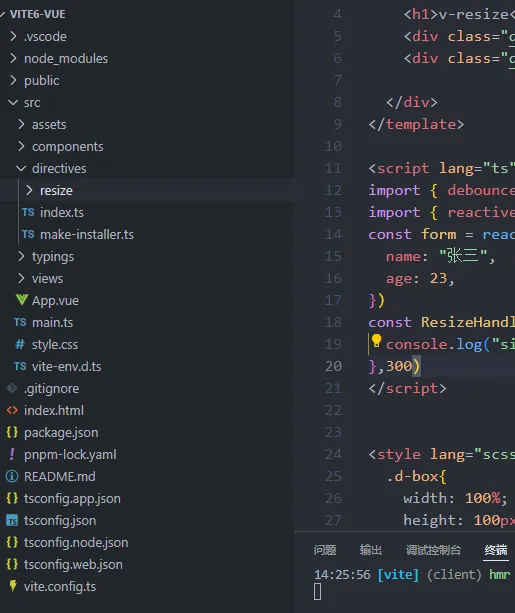
src/directives/make-installer.ts
tsimport type { App, Plugin } from "@vue/runtime-core";
const INSTALLED_KEY = Symbol("MY_CUSTOM_DIRECTIVES_INSTALLED");

export const makeInstaller = (directives: Plugin[] = []) => {
  const install = (app: App) => {
    if (app[INSTALLED_KEY]) return;
    app[INSTALLED_KEY] = true;
    directives.forEach(directives => {
      app.directive(directives.name, directives.directive);
    })
  };

  return {
    install,
  };
};
src/directives/index.ts
tsimport { makeInstaller } from "./make-installer";
import Resize from "./resize";

const Directives = [Resize];

export default makeInstaller([...Directives]);
main.ts
tsimport { createApp } from 'vue'
import './style.css'
import App from './App.vue'

import directives from './directives';

const app = createApp(App);

app.use(directives);
app.mount("#app");
v-resize
监听dom元素尺寸变化
指令源码
tsimport type { DirectiveBinding, ObjectDirective } from "vue"

const map = new WeakMap()
const ob = new ResizeObserver(entries => {
  for (const entry of entries) {
    const handler = map.get(entry.target)
    if (handler) {
      const { inlineSize, blockSize } = entry.contentBoxSize[0]
      handler({ width: inlineSize, height: blockSize })
    }
  }
})

const Resize: ObjectDirective = {
  created(el: HTMLElement, binding: DirectiveBinding) {
    console.log(binding)
    map.set(el, binding.value);
    ob.observe(el);
  },
  beforeUnmount(el: HTMLElement) {
    ob.unobserve(el);
  },
};

export default {
  name: "resize",
  directive: Resize,
};
使用案例
vue<template>

  <div class="w-100">
    <h1>v-resize</h1>
    <!--指令后面可以使用 :参数 来传参-->
    <div class="d-box" v-resize:[form]="ResizeHandler">我是div1</div>
    <div class="d-box">我是div2</div>

  </div>
</template>

<script lang="ts" setup>
import { debounce } from "lodash-unified"
import { reactive } from "vue";
const form = reactive({
  name: "张三",
  age: 23,
})
const ResizeHandler = debounce((size) => {
  console.log("size: ", size)
},300)
</script>


<style lang="scss" scoped>
  .d-box{
    width: 100%;
    height: 100px;
    border: 1px solid black;
  }
</style>
如果对你有用的话,可以打赏哦
打赏


本文作者:繁星
本文链接:
版权声明:本博客所有文章除特别声明外,均采用 BY-NC-SA 许可协议。转载请注明出处!
目录