请注意,本文编写于 928 天前,最后修改于 41 天前,其中某些信息可能已经过时。
目录
Angular通过实现ControlValueAccessor接口来实现自定义表单组件,在模版驱动表单和响应式表单下实现数据的双向绑定,本文通过封装一个已有的Input组件,来添加tooltip的功能
组件代码
tsimport { ChangeDetectionStrategy, ChangeDetectorRef, Component, forwardRef, Input, OnChanges, OnDestroy, OnInit, ViewChild } from '@angular/core';
import { ControlValueAccessor, NG_VALUE_ACCESSOR } from '@angular/forms';

@Component({
  selector: 'tl-tuiwrap-input',
  templateUrl: './input-wrap.component.html',
  providers: [
    {
      provide: NG_VALUE_ACCESSOR,
      useExisting: forwardRef(() => TlInputWrapComponent),
      multi: true
    }
  ],
  preserveWhitespaces: false,
  changeDetection: ChangeDetectionStrategy.OnPush,
  host: {
    '[class.tl-tuiwrap-input]': 'true',
  }
})
export class TlInputWrapComponent implements OnInit, OnDestroy, ControlValueAccessor, OnChanges {

  _value:any

  @Input()
  tlPlaceholder = "请输入"

  @Input()
  tlReadonly = false

  @Input()
  tlDisabled = false

  @Input()
  tlTooltip = true

  showTooltip = false; // 鼠标滑过overflow文本时,再检查是否需要显示

  @ViewChild('contentRef')
  contentRef: any;

  // 输入框数据变化时
  onChange: (value: string) => void = () => null;
  onTouched: () => void = () => null;

  constructor(private cdr: ChangeDetectorRef) {}
  ngOnDestroy(): void {

  }

  get nzValue(): string {
    return this._value;
  }

  set nzValue(input: string) {
    if (this._value === input) {
      return;
    }

    this._value = input;

    this.onChange(input)
  }

  // 向视图写入数据
  writeValue(obj: any): void {
    //console.log("writeValue: ",obj);
    //this._value = obj
    this.nzValue = obj
    this.cdr.markForCheck();
  }

  // UI界面值发生更改,调用注册的回调函数
  registerOnChange(fn: any): void {
    this.onChange = fn;
  }

  // 在blur(等失效事件),调用注册的回调函数
  registerOnTouched(fn: any): void {
    this.onTouched = fn;
  }

  // 设置禁用状态
  setDisabledState?(isDisabled: boolean): void {
    this.tlDisabled = isDisabled

  }
  ngOnChanges(): void {
    //console.log(changes);

  }

  ngOnInit(): void {}

  handleTooltipIn() {
    if(this.tlTooltip){
      const $content = this.contentRef.nativeElement;
      this.showTooltip = $content.scrollWidth > $content.offsetWidth;
    }

  }
}
html<input
  class="tl-tuiwrap-input-container"
  tInputText
  [disabled]="tlDisabled"
  [readonly]="tlReadonly"
  [placeholder]="tlPlaceholder || '请输入'"
  [(ngModel)]="nzValue"
  autocomplete="off"
  tTooltip="{{ nzValue }}"
  tooltipPosition="bottom"
  [tooltipDisabled]="!showTooltip"
  (mouseenter)="handleTooltipIn()"
  #contentRef
/>
less.tl-input-wrap{
    white-space: nowrap;
    overflow: hidden;
    text-overflow: ellipsis;
}
.tl-tuiwrap-input-container{
    white-space: nowrap;
    overflow: hidden;
    text-overflow: ellipsis;
}
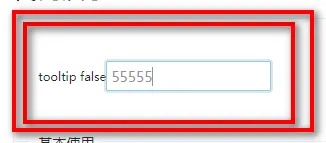
效果如下

如果对你有用的话,可以打赏哦
打赏


本文作者:繁星
本文链接:
版权声明:本博客所有文章除特别声明外,均采用 BY-NC-SA 许可协议。转载请注明出处!
目录